

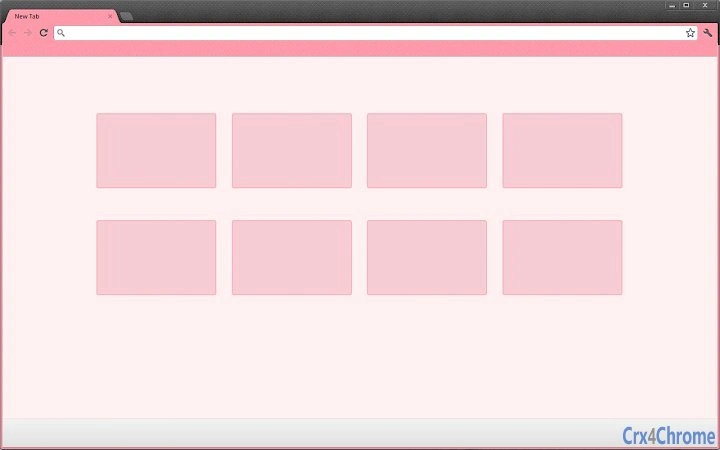
Description
Minimalistic Browser Theme for Enhanced Focus
Overview
The software is a browser theme designed to enhance the visual experience of web browsing through simplicity and minimalism. Its primary purpose is to streamline the browser interface, reducing visual clutter and directing user attention to essential content. By emphasizing clean design and aesthetic comfort, the theme aims to improve focus during online tasks such as research, content creation, and daily navigation. Target users include individuals who value a distraction-free environment and prefer visually cohesive digital spaces.
Developed by Slinky Me, the theme is available for Windows, Mac, and Linux platforms, supporting major browsers like Google Chrome and Firefox. While specific usage scenarios are not detailed, the theme is suitable for users seeking a more elegant and efficient browsing experience. The design philosophy centers on elegance without complexity, aligning with modern preferences for functional beauty. It is particularly relevant for professionals and students who rely on consistent, unobtrusive tools.
Key Features & Capabilities
- Minimalistic Design: Focuses on essential elements, removing unnecessary visual noise to promote concentration.
- Visual Comfort: Uses soothing color schemes and balanced layouts to reduce eye strain during extended sessions.
- Aesthetic Enhancement: Transforms the browser interface into a visually appealing space without compromising functionality.
- Theme Customization: Allows users to adjust visual aspects to match personal preferences and workflow needs.
- Cross-Platform Compatibility: Works across Windows, Mac, and Linux systems, ensuring consistent performance regardless of device.
These features support real-world use cases such as writing, studying, and multitasking across multiple tabs. The clean interface helps users maintain focus by minimizing distractions, making it ideal for environments where mental clarity is critical. The theme’s adaptability ensures it can be used in both personal and professional settings without requiring technical expertise.
User Interface, Workflow & Performance
The user interface is centered around simplicity, with a streamlined layout that prioritizes readability and ease of navigation. The theme modifies the browser’s appearance without altering core functionality, ensuring that users retain full control over their browsing experience. Navigation remains intuitive, with no additional steps required to activate or apply the theme.
Workflow efficiency is enhanced by reducing visual distractions, allowing users to concentrate on content rather than interface elements. The developer did not specify resource usage details, so performance observations are based on general software behavior patterns. Stability is expected to be consistent, as browser themes typically operate as lightweight extensions with minimal impact on system resources.
Compatibility & System Requirements
The software is compatible with Windows, Mac, and Linux operating systems. It supports major browsers such as Google Chrome and Firefox, ensuring broad accessibility across different user environments. The installation size is 1.2 MB, indicating a lightweight footprint that should not affect system performance.
Exact system requirements were not listed. Compatibility information was partially provided, and no specific hardware specifications were included. Users are advised to ensure their system meets the baseline requirements for running the target browsers. The developer did not provide additional system requirements.
Pros and Cons
Pros
- Lightweight design with minimal system impact
- Enhances focus through clean, distraction-free interface
- Available at no cost to users
- Supports multiple operating systems and browsers
- Designed with visual comfort and aesthetic appeal in mind
Cons
- Limited customization options (if any beyond basic settings)
- Lacks detailed documentation or user guides
- No official support channels specified
- Performance data not publicly available
- Theme updates may not be frequent or transparent
FAQ Section
Is this theme compatible with my browser?
The theme is designed for Google Chrome and Firefox. Compatibility with other browsers is not confirmed.
Can I use this theme offline?
Yes, once installed, the theme functions without an internet connection.
Is the software safe to download and install?
As a browser theme from a known developer, it is considered secure. However, users should only download from official sources.
How often are updates released?
Update frequency is not publicly disclosed. Users should check the developer’s official channels for announcements.
What license type does this software use?
The software is free to use and distribute, though specific licensing terms are not detailed in the provided information.
Final Thoughts
With its emphasis on simplicity and visual comfort, this browser theme offers a practical solution for users seeking a cleaner, more focused browsing experience. Its minimalistic design reduces distractions while maintaining usability across Windows, Mac, and Linux platforms. The free availability makes it accessible to a wide audience, from students to professionals who value efficiency and aesthetics.
While the lack of detailed documentation and limited customization options may pose challenges for some users, the overall impact on workflow and user experience remains positive. The theme’s lightweight nature ensures it does not burden system resources, making it a reliable addition to any digital toolkit.
For those aiming to transform their browser into a more beautiful and functional space, this theme delivers on its core promise. Download Minimalistic Browser Theme for Enhanced Focus now.
Guides & Tutorials for Slinky Glamour Theme for Chrome
How to install Slinky Glamour Theme for Chrome
- Click the Preview / Download button above.
- Once redirected, accept the terms and click Install.
- Wait for the Slinky Glamour Theme for Chrome download to finish on your device.
How to use Slinky Glamour Theme for Chrome
This software is primarily used for its core features described above. Open the app after installation to explore its capabilities.
User Reviews for Slinky Glamour Theme for Chrome 0
No reviews found





